
Time Scheduling allows you to show your ads only at specific times of day and/or on specific days of the week.
Example Schedule
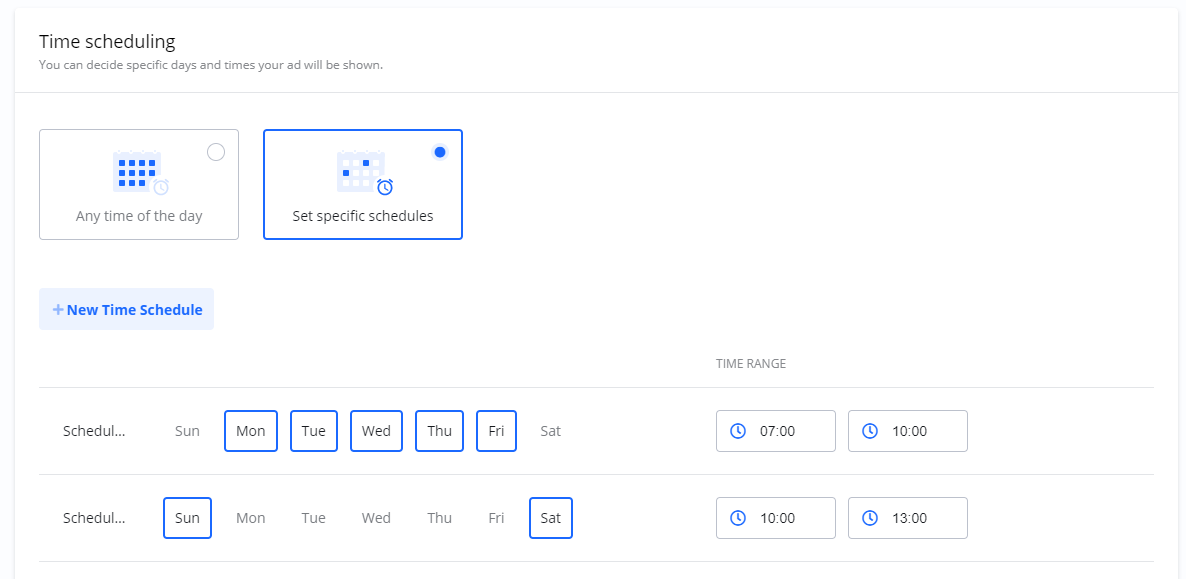
You can set multiple rules to create a custom schedule. For example, you could configure a Campaign to run only during morning commute hours on weekdays and during the middle of the day on weekends.
|
Days |
Time Slot |
|---|---|
|
Weekdays |
07:00 - 10:00 (7 AM - 10 AM) |
|
Weekends |
10:00 - 13:00 (10 AM - 1 PM) |
At all other times, the Campaign would be paused.
Frequently Asked Questions
Q: What is Time Scheduling?
A: It is a feature that gives you control over the specific days and times your Campaign ads are shown to users.
Q: Can I set different time slots for different days?
A: Yes. As shown in the example, you can set unique schedules for different days or groups of days (e.g., weekdays vs. weekends).
Q: What happens if I don't set a time schedule?
A: If you do not configure a time schedule, your Campaign will be eligible to run 24 hours a day, 7 days a week, for the entire duration of its flight dates.