
Geographical Targeting enables you to serve your ads only to users in specific locations that you choose. In addition, you can exclude locations, which will prevent your ads from showing in certain parts of your targeted locations.
You can find locations by expanding the options (DMA REGION, STATE, ZIP CODE) or by searching directly.
What is a DMA Region?
Designated Market Area (DMA) is an advertising term for specific regions in the United States that have been divided into separate marketing areas. There are 210 DMAs covering the entire United States, and they are usually defined based on metropolitan areas.
How to Include and Exclude Locations
-
Search for a location by typing its name or zip code into the search box.
-
From the search results, choose one of two actions for the location:
-
To target the location, select the Include icon
.
-
To prevent your ads from showing in that location, select the Exclude icon
.
-
-
Repeat this process to build your targeting list.
-
When you are finished, click Next.
Example: Targeting California while Excluding Cities
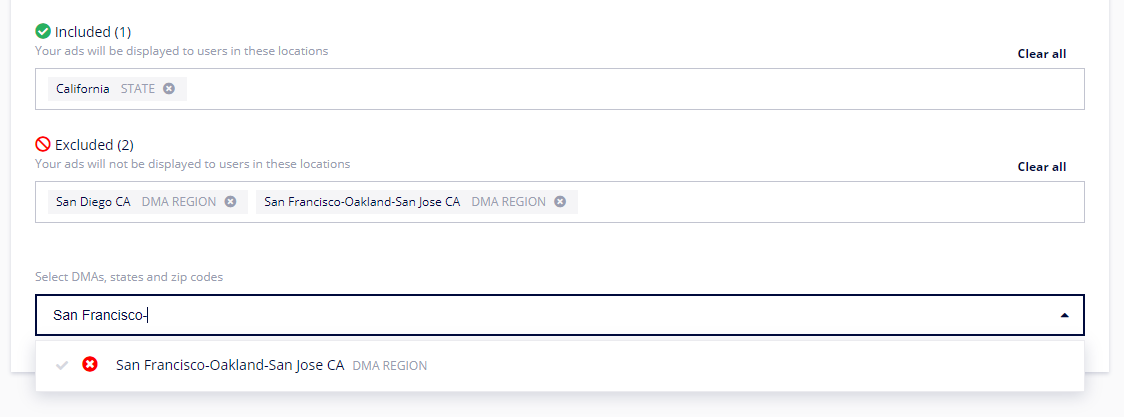
Imagine you want to run a Campaign for your real estate chain across California, but you do not have locations in San Francisco or San Diego. You would set this up as follows:
|
Action |
Location Searched |
Button Clicked |
|---|---|---|
|
1 |
California |
Include |
|
2 |
San Diego |
Exclude |
|
3 |
San Francisco |
Exclude |
This configuration will show your ad to users across the entire state of California except for those in San Diego and San Francisco.
Core Logic Rules for Geo-Targeting
It is critical to understand the default logic:
-
Including one excludes all others: If you Include one location (e.g., California), all other locations at that same level (e.g., all other states) are automatically excluded.
-
Excluding one includes all others: If you Exclude one location (e.g., California), your ads will be shown to users in all other states except California.
-
Selecting nothing includes everything: If you do not select any include or exclude rules, your ads will be shown to all audiences, regardless of their geographic location.
Frequently Asked Questions
Q: What is the difference between Include and Exclude?
A: Include tells the system where you want to show your ads. Exclude tells the system where you do not want to show your ads, even if it is inside a larger included area.
Q: If I want to target the entire United States except for one state, what should I do?
A: You should only add one rule: find that specific state and click the Exclude icon. All other states will be included by default.
Q: What happens if I don't set any geographical targeting?
A: If you do not add any include or exclude rules, your Campaign will be shown to users in all locations.